Thanks for choosing BadCopy Pro
Step by Step Guide to Enter Registration Key
Get
registration key from confirmation e-mail
If you purchased BadCopy Pro online and your order was approved by our online order processor, usually in several minutes, you will receive the confirmation e-mail that contains your registration key. For example, if you ordered from RegNow, you should get an e-mail from Jufsoft (support@jufsoft.com) with subject "Your Order with Jufsoft", or "Your Order for BadCopy Pro". The registration key can be found in the body of this e-mail.
If you ordered from other vendors, such as RegSoft or Shareit, the confirmation e-mail is similar.
An example confirmation e-mail:
FIRSTNAME LASTNAME,
Thank you for your recent purchase! Provided below is important information about the delivery of your products. It is recommended that you print or save this email for future reference. Should you experience any product related problems, please use the support information found below.
PLEASE LOOK FOR THE FOLLOWING ON YOUR CREDIT CARD STATEMENT "DRI*BADCOPY PRO"
--------------------------------------------------
Order Details
--------------------------------------------------
November 25, 2007
Registration Backup Service (1234-28)
Support E-Mail: accounts@regnow.com
Thank you for your purchase of the Extended Download Service. If you need to download your software at a later date please visit our order lookup at https://www.regnow.com/order_lookup.html. Please note you will need your order ID listed below or the last five-digits of your credit card.
BadCopy Pro (8241-1)
Support E-Mail: support@jufsoft.com
*Your registration key:
JFKTQArbPz5So9ffCX3w7koEXYQk1lP7fyRGKs3dgTMbS
vA7Z-6dwOskLP9WkespG5k5h72JecWjeRkQ5IkQ1zdE2D
5852fEeVx3cgjwb5gCSgcFdNd2glURAwlF6nXISEkomZF
yhcT2WHYf6acUo41eaCBevrQVSkB8YC0MX4eG-oQoARNc
* Note: total 4 lines, please use copy and paste.
Thank you for your recent purchase! Provided below is important information about the delivery of your products. It is recommended that you print or save this email for future reference. Should you experience any product related problems, please use the support information found below.
PLEASE LOOK FOR THE FOLLOWING ON YOUR CREDIT CARD STATEMENT "DRI*BADCOPY PRO"
--------------------------------------------------
Order Details
--------------------------------------------------
November 25, 2007
Registration Backup Service (1234-28)
Support E-Mail: accounts@regnow.com
Thank you for your purchase of the Extended Download Service. If you need to download your software at a later date please visit our order lookup at https://www.regnow.com/order_lookup.html. Please note you will need your order ID listed below or the last five-digits of your credit card.
BadCopy Pro (8241-1)
Support E-Mail: support@jufsoft.com
*Your registration key:
JFKTQArbPz5So9ffCX3w7koEXYQk1lP7fyRGKs3dgTMbS
vA7Z-6dwOskLP9WkespG5k5h72JecWjeRkQ5IkQ1zdE2D
5852fEeVx3cgjwb5gCSgcFdNd2glURAwlF6nXISEkomZF
yhcT2WHYf6acUo41eaCBevrQVSkB8YC0MX4eG-oQoARNc
* Note: total 4 lines, please use copy and paste.
Important The registration key block marked in red above could be found in the
e-mail you received. The key in this page is just a sample for demo purpose. It is NOT your valid registration key.
Open
registration key input box
1. If your data recovery is in progress, check this screenshot.
2. If your data recovery hasn't started yet, check this screenshot.
Enter
your valid registration key and click OK.
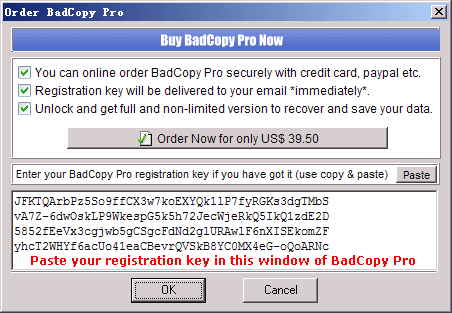
Your
BadCopy Pro software is now fully licensed and the restrictions
in the evaluation version are removed.
If you have any trouble entering the registration
key, please contact our technical
support team with your order ID for further assistance.